
Understanding Your RV Automatic Changeover Regulator: What the Green and Red Indicator Really Mean
An RV automatic changeover regulator is designed to provide an uninterrupted supply of propane by automatically switching from one cylinder to another when the primary cylinder becomes empty. While the automatic changeover feature is straightforward, the regulator's green and red indicator is often misunderstood.
Many RV owners mistakenly believe that the indicator tells them which cylinder is currently supplying propane. It doesn't.
Understanding what the indicator is actually telling you can help prevent confusion and ensure you always know the status of your propane cylinders.
How an Automatic Changeover Regulator Works
A typical RV automatic changeover regulator connects two propane cylinders.
Before using your propane system:
- Open the valves on both cylinders.
- Turn the selector lever so it points toward the cylinder you want to use first.
- That cylinder becomes the service cylinder.
- The opposite cylinder becomes the reserve cylinder.
As propane is consumed, the regulator supplies gas from the selected service cylinder.
When that cylinder becomes empty, the regulator automatically begins drawing propane from the reserve cylinder. Your furnace, refrigerator, water heater, stove, and other propane appliances continue operating without interruption. Please note that a slight reduction in BTU flow may occur during the changeover period.
That's the "automatic" part of the regulator.
What the Green Indicator Means
When the indicator is GREEN, everything is operating normally.
A green indicator means:
- The cylinder selected by the selector lever contains propane.
- That selected cylinder is the designated service cylinder.
- No action is required.
What the Red Indicator Means
When the indicator changes to RED, many people assume their RV has run out of propane.
That's not the case.
A red indicator means:
- The selected service cylinder is empty.
- The regulator has automatically switched to the reserve cylinder.
- Your propane appliances continue receiving gas from the reserve cylinder.
In other words, red does not mean you have no propane—it means the regulator is now supplying propane from the reserve cylinder while indicating that the selected cylinder is empty.
This visual indication lets you know that one cylinder needs to be refilled while your RV continues operating normally.
Why Doesn't the Selector Lever Move?
One of the most common misconceptions is that the selector lever should automatically move when the regulator changes cylinders.
It does not.
The regulator changes the propane supply internally, but the selector lever remains pointed toward the originally selected cylinder. This is intentional because it provides a clear visual reference for the indicator.
Since the selector continues pointing to the original service cylinder, the indicator can accurately display RED when that cylinder becomes empty. This makes it easy to identify which cylinder requires refilling.
Understanding the Indicator at a Glance
Indicator Color | What It Means |
Green | The selected service cylinder contains propane and is available to supply the system. |
Red | The selected service cylinder is empty. The regulator has automatically switched to the reserve cylinder, and propane continues to flow without interruption. |
Common Misconceptions
- "Red means I'm out of propane."
False. Red simply indicates the selected cylinder is empty. The regulator has already changed over to the reserve cylinder, so your RV continues receiving propane.
- "The selector lever should move automatically."
False. The selector lever is designed to remain in its original position. This allows the red indicator to clearly identify which cylinder has been depleted.
- "The indicator shows which cylinder is currently supplying propane."
False. The indicator reflects the status of the selected cylinder, not the cylinder currently supplying propane after an automatic changeover.
The Key Takeaway
The automatic changeover regulator is designed to keep your propane system operating without interruption, but the red/green indicator is what tells the story.
- GREEN indicates the selected service cylinder contains propane.
- RED indicates the selected service cylinder is empty, and the regulator has automatically switched to the reserve cylinder.
- The selector lever does not move automatically. It remains in its original position to provide a clear visual indication of which cylinder has been depleted.
By understanding how the indicator works, RV owners can quickly identify when a propane cylinder needs refilling while enjoying the peace of mind that comes with continuous propane service.
Understanding Your RV Automatic Changeover Regulator: What the Green and Red Indicator Really Mean
An RV automatic changeover regulator is designed to provide an uninterrupted supply of propane by automatically switching from one cylinder to another when the primary cylinder becomes empty. While the automatic changeover feature is straightforward, the regulator's green and red indicator is often misunderstood.
Many RV owners mistakenly believe that the indicator tells them which cylinder is currently supplying propane. It doesn't.
Understanding what the indicator is actually telling you can help prevent confusion and ensure you always know the status of your propane cylinders.
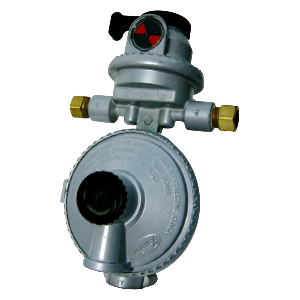
How an Automatic Changeover Regulator Works
A typical RV automatic changeover regulator connects two propane cylinders.
Before using your propane system:
- Open the valves on both cylinders.
- Turn the selector lever so it points toward the cylinder you want to use first.
- That cylinder becomes the service cylinder.
- The opposite cylinder becomes the reserve cylinder.
As propane is consumed, the regulator supplies gas from the selected service cylinder.
When that cylinder becomes empty, the regulator automatically begins drawing propane from the reserve cylinder. Your furnace, refrigerator, water heater, stove, and other propane appliances continue operating without interruption. Please note that a slight reduction in BTU flow may occur during the changeover period.
That's the "automatic" part of the regulator.
What the Green Indicator Means
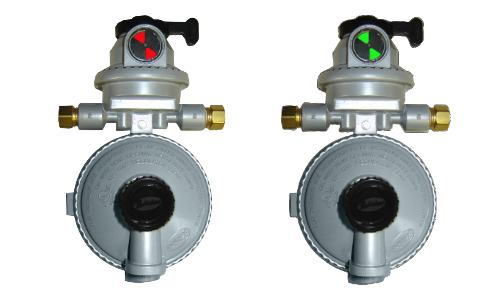
When the indicator is GREEN, everything is operating normally.
A green indicator means:
- The cylinder selected by the selector lever contains propane.
- That selected cylinder is the designated service cylinder.
- No action is required.
What the Red Indicator Means
When the indicator changes to RED, many people assume their RV has run out of propane.
That's not the case.
A red indicator means:
- The selected service cylinder is empty.
- The regulator has automatically switched to the reserve cylinder.
- Your propane appliances continue receiving gas from the reserve cylinder.
In other words, red does not mean you have no propane—it means the regulator is now supplying propane from the reserve cylinder while indicating that the selected cylinder is empty.
This visual indication lets you know that one cylinder needs to be refilled while your RV continues operating normally.
Why Doesn't the Selector Lever Move?
One of the most common misconceptions is that the selector lever should automatically move when the regulator changes cylinders.
It does not.
The regulator changes the propane supply internally, but the selector lever remains pointed toward the originally selected cylinder. This is intentional because it provides a clear visual reference for the indicator.
Since the selector continues pointing to the original service cylinder, the indicator can accurately display RED when that cylinder becomes empty. This makes it easy to identify which cylinder requires refilling.
Understanding the Indicator at a Glance
Indicator Color | What It Means |
Green | The selected service cylinder contains propane and is available to supply the system. |
Red | The selected service cylinder is empty. The regulator has automatically switched to the reserve cylinder, and propane continues to flow without interruption. |
Common Misconceptions
"Red means I'm out of propane."
False. Red simply indicates the selected cylinder is empty. The regulator has already changed over to the reserve cylinder, so your RV continues receiving propane.
"The selector lever should move automatically."
False. The selector lever is designed to remain in its original position. This allows the red indicator to clearly identify which cylinder has been depleted.
"The indicator shows which cylinder is currently supplying propane."
False. The indicator reflects the status of the selected cylinder, not the cylinder currently supplying propane after an automatic changeover.
The Key Takeaway
The automatic changeover regulator is designed to keep your propane system operating without interruption, but the red/green indicator is what tells the story.
- GREEN indicates the selected service cylinder contains propane.
- RED indicates the selected service cylinder is empty, and the regulator has automatically switched to the reserve cylinder.
- The selector lever does not move automatically. It remains in its original position to provide a clear visual indication of which cylinder has been depleted.
By understanding how the indicator works, RV owners can quickly identify when a propane cylinder needs refilling while enjoying the peace of mind that comes with continuous propane service.